Tampilkan postingan dengan label all zenfone. Tampilkan semua postingan


PSP EMULATOR FOR ANDROID....................
Play your favourite psp games now on mobile all psp games are supported
Note:-some games that have been tried by previous users
here is the list
here is the list
1.Persona 2,3
2.Dragon ball z
3.Final fantasy Crisis core
4.Tekken5.Wipeout
2.Dragon ball z
3.Final fantasy Crisis core
4.Tekken5.Wipeout
Steps to install a game
1.Download the app - click here
1.Download the app - click here
2.Download your favourite psp game iso bit of google search required
you can check this site for more
http://www.emuparadise.me/PSP_ROMs/44
you can check this site for more
http://www.emuparadise.me/PSP_ROMs/44
3.Paste the iso in internal storage in the following folder
/sdcard/PSP/GAME (sdcard doesnt mean micro sd card)
/sdcard/PSP/GAME (sdcard doesnt mean micro sd card)
4.Click games tab and go to your internal storage by clicking the 3 dots(refer to below pic) available and go to the destination load your iso
5.Game getes automatically installed which you can find in the recent tab and launch
................Njoy................................................
................Njoy................................................

Xposed For Zenfone Lollipop

Xposed For Zenfone Lollipop (Works with kitkat also)
Xposed is in beta stage for lollipop this is specially modified one for lollipop............................
Download from Here.........
HTC Sense Music Player + Beats Lollipop Edition - ASUS Zenfone 4/4.5/5/6
Well..This Post Gonna Give you the HTC Sense Music Player which is Ported from my HTC Desire 820 and Beats Ultimate Audio Engine Installer
PreRequisites:
!-> Asus Zenfone 4/4.5/5/6 with Rooted Lollipop Firmware TW/CHT/WW
!-> Proper ADB Setup
!-> Download This File - HTC Sense Music + Beats UAE
!-> For Rooting Lollipop Firmware - Click here
!-> For ADB Setup - Click Here
Procedure:
Step #1: Extract the rar file using the Password: zenfone-five.blogspot.com
Step #2: Plug-in Your Phone to PC via USB
Step #3: Find Installer.exe inside the Extracted folder...It is Completely Virus Free..I Guarantee..As You have downloaded from the Internet Your Anti-virus may Give you the Warning to execute.If yes,Just Ignore or Add to Whitelist ..
As the Lollipop Took more Space inside the System...the Installer will delete the following unnecessary apps - Play Books,Play News Stand,Play Movies,Talkback,Zinio Reader,Zinio Settings,Data Transfer..Inorder to Freeup the space to 40MB..for the installation
IF YOU WANT TO INSTALL BOTH..THEN FIRST INSTALL BEATS AND GO FOR HTC MUSIC TO AVOID THE HOTBOOTS
Step #4: Give your Choice..Whether you want to Install HTC Music Player or Beats UAE..You can install both at same time..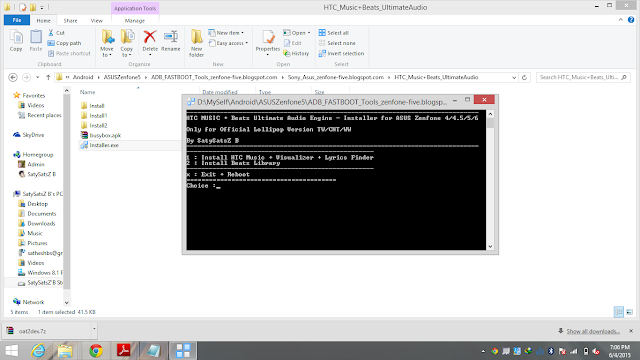
Step #5: After installation Press X to Reboot...
That's all...!
HTC Music Player Features:
--Sense Music Lockscreen Controls


Known Bug:
The Song Name won't change after You press Next until you Change the Activity Screen to other Activity..and this is not a Major Bug and it won't affect other Functionalities.. :-D
Thank You..!
~SatySatsZ B
Please Share and hit +1 If you like this Post...! :-D
Read more
PreRequisites:
!-> Asus Zenfone 4/4.5/5/6 with Rooted Lollipop Firmware TW/CHT/WW
!-> Proper ADB Setup
!-> Download This File - HTC Sense Music + Beats UAE
!-> For Rooting Lollipop Firmware - Click here
!-> For ADB Setup - Click Here
Procedure:
Step #1: Extract the rar file using the Password: zenfone-five.blogspot.com
Step #2: Plug-in Your Phone to PC via USB
Step #3: Find Installer.exe inside the Extracted folder...It is Completely Virus Free..I Guarantee..As You have downloaded from the Internet Your Anti-virus may Give you the Warning to execute.If yes,Just Ignore or Add to Whitelist ..
As the Lollipop Took more Space inside the System...the Installer will delete the following unnecessary apps - Play Books,Play News Stand,Play Movies,Talkback,Zinio Reader,Zinio Settings,Data Transfer..Inorder to Freeup the space to 40MB..for the installation
IF YOU WANT TO INSTALL BOTH..THEN FIRST INSTALL BEATS AND GO FOR HTC MUSIC TO AVOID THE HOTBOOTS

Step #5: After installation Press X to Reboot...
That's all...!
HTC Music Player Features:
--Recompiled Sense Music ARM Library files for x86
--Full Functionality as Same as in the Sense ROM
--GreenNote Lyrics Finder and Downloader
--Lyrics Sync and Player
--Album Art and Details Updater
--Full Functionality as Same as in the Sense ROM
--GreenNote Lyrics Finder and Downloader
--Lyrics Sync and Player
--Album Art and Details Updater
--Sense Music Lockscreen Controls
--Complete Visualizer with 10 Scenes
--Beats Audio Detection
Beats UAE for Lollipop Features:
- Clear sound
- Beats™ Audio
- Also compatible with the headphones that don't support audio render of 60kHz
- Where possible, arrange for the conversion of the songs (in background) below 256 kbps to 320kbps
- During playback of songs / sounds make a soft frequency scaling to reduce noise and highlight the track
- It offers more powerful and closed bass
- Efficient even with stock headphones
- Improves a lot the audio call
- Enhance the speakers for playing music without headphones in high quality
-320Kbps Conversion for Crystal clear Audio output
-Increases Sound Output in both Loudspeaker and Line-outs
Thanks to Edwin Adato For his Tip to Edit the Lib files using Hex Editor..
ScreenShots


Known Bug:
The Song Name won't change after You press Next until you Change the Activity Screen to other Activity..and this is not a Major Bug and it won't affect other Functionalities.. :-D
Thank You..!
~SatySatsZ B
Please Share and hit +1 If you like this Post...! :-D
ROOT Asus Zenfone 4 4.5 5 6 Lollipop-Official TW CHT WW [NEW]
This is Not My work Am Just Sharing the Tool here...Complete Credit Goes to Shakalaca,Who Made this Root Tool for our Zenfone 4/4.5/5/6
Extract it
Run Root.bat
Make Sure You have Enabled USB Debugging and Authorized the Connection before Proceeding..!
Wait 2~3 Mins it will Root your Phone and Restarts Automatically
Thank you...!
Thank you...!

MIUI For Asus Zenfone 4 / 4.5 / 5 / 6 - NO ROOT NEEDED
Well..Today I am gonna Share you the MIUI 6 Express APK For all Users including for Non-Rooted Users
Install as Normal
Set as Default Launcher..
This Express Version Includes : MIUI Contacts,Dialer,Messages,LockScreen,and Weather Widget...!
Initial Run of the App may take some minutes as it Auto Organizes the Apps
Screenshots


UPDATED Beats Ultimate Audio Engine - Asus Zenfone 4/5/6 JB/KK/L
In this Post, Am gonna share you the Beats Audio Engine
*This Needs ROOT*

Supported for ASUS Zenfone 4/4.5/5/6 - JellyBean / KitKat / Lollipop Firmwares
FEATURES
-Clear sound
- Beats™ Audio
- Also compatible with the headphones that don't support audio render of 60kHz
- Where possible, arrange for the conversion of the songs (in background) below 256 kbps to 320kbps
- During playback of songs / sounds make a soft frequency scaling to reduce noise and highlight the track
- It offers more powerful and closed bass
- Efficient even with stock headphones
- Improves a lot the audio call
- Enhance the speakers for playing music without headphones in high quality
-320Kbps Conversion for Crystal clear Audio output
-Increases Sound Output in both Loudspeaker and Line-outs
"ENABLE MUSIC MODE IN AUDIO WIZARD TO MAKE IT LOUDER and FULL FUNCTIONAL"
"You can Customize the Beats Audio with the Beats Widget"
"ENABLE MUSIC MODE IN AUDIO WIZARD TO MAKE IT LOUDER and FULL FUNCTIONAL"
"You can Customize the Beats Audio with the Beats Widget"
WORKS WELL WITH WALKMAN MOVIES ALBUM
Installation
DOWNLOAD THIS RAR FILE(UPDATED TO ULTIMATE MOD)
Extract using the Password : zenfone-five.blogspot.com
Make Sure ADB is Ready
Find Installer.bat inside that
Launch it and Follow the Instruction which are Provided in that
TO Revert back,Sideload the Firmware to Restore your Original System Files
ENJOY..!! (*_*) Beats
SCREENSHOTS


If You Like this Hit +1 and Comment
Support Me and My Blog to Get more MODs and Developments
Support Me and My Blog to Get more MODs and Developments
Langganan:
Postingan (Atom)
Popular
-
Tips memilih peluru/ mimis/ pellet senapan angin

-
5 tips dan cara memancing ikan betok/betik/pepuyu
-
4 Senapan Angin Uklik / Pompa Terbaik Di Indonesia

-
Cara Membuat Kunci Pengaman Pada Sepeda Motor

-
5 jenis senapan angin
-
Download Google Chrome 43 Final 2015 Full Offline Installer

-
Kumpulan Foto Modifikasi Daihatsu Taft Terbaru

-
Kumpulan Foto Hasil Modifikasi Motor Suzuki Tornado 110

-
Galeri Foto Modifikasi Mobil Isuzu Panther Terbaru

-
20 Modifikasi Motor Honda C70 Yang Unik Dan Elegan


